Variables In Python - Part 2
Posted on Sat 12 October 2019 in Python
This article is part2 of a series introducing Python variables through illustrative diagrams.
In part1 of the series, we looked at what variables are and how assignment works. In this post, we are going to see about mutable and immutable objects. and how variables work with them.
Mutable and Immutable objects?
An object whose value can be changed after the object is created is a Mutable object. list, dict,
set are examples of mutable types.
On the contrary, an object whose values cannot be changed is called an Immutable object. int,
float, string, tuples are immutable types. There does not exist any method on these types that
could change the values of objects of these types.
Example: Mutable object
>>> my_list = [1, 2, 3, 4]
>>> my_list
[1, 2, 3, 4]
>>> id(my_list)
139974176509384
>>>
>>>
>>> my_list.append(5)
>>> my_list
[1, 2, 3, 4, 5]
>>> id(my_list)
139974176509384
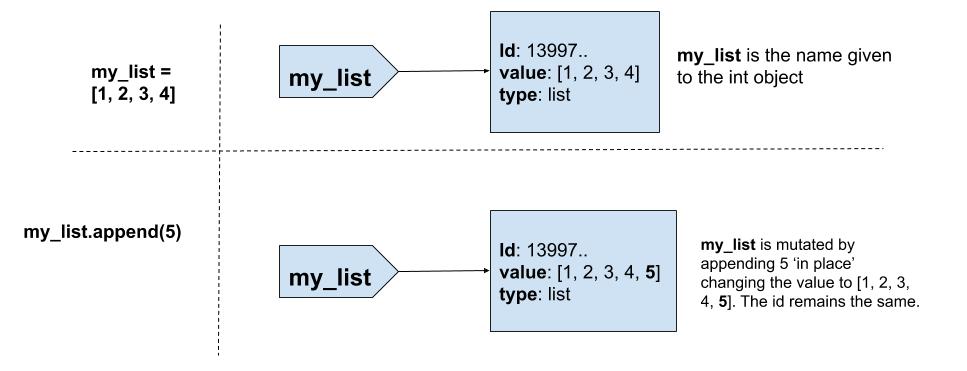
In the code above, the list object [1, 2, 3, 4] is mutable. I used the append method on the list
object to change the value of the object in place. The append method did not create a new list(id remains the same).
However, it changed the value of the list object to [1, 2, 3, 4, 5]
Example: Immutable object
>>> x = 100
>>> x
100
>>> id(x)
94499348082656
>>> y = x
>>> y
100
>>> id(y)
94499348082656
>>>
>>>
>>> x = 200
>>> x
200
>>> id(x)
94499348085856
>>> y
100
>>> id(y)
94499348082656
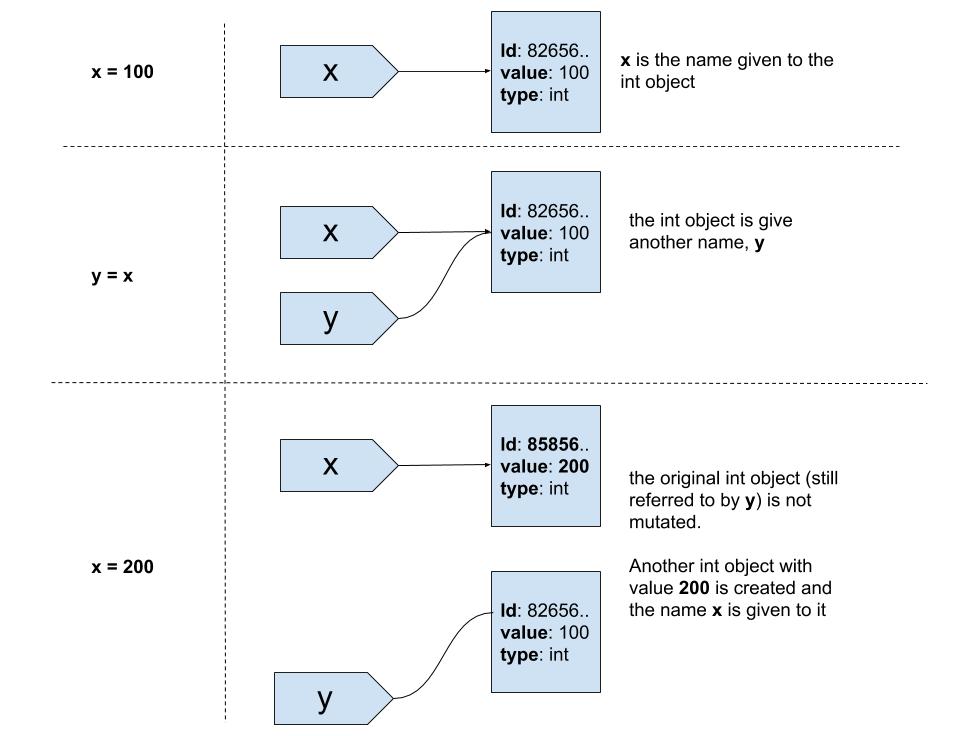
Let's take a look at the code above. I created an int object with value 100 and assigned 2 names
to it x and y. We looked at the object referred by x and y and as expected, the object is the same
(both value and id are the same).
Next I did x = 200. This did not change the value of the int object with value 100(This is confirmed
by examining y). Instead, a new object with value 200 was created and the name x was attached to it.
Rebinding and Mutating
We are going to take a closer look at how variables work with mutable and immutable objects
and understand the concepts of rebinding and mutating
Rebinding
>>> x = 100
>>> x = x + 10
>>> x
110
Here x refers to 100. Then x + 10 creates another int object 110 and x is rebound to it. x no longer refers to 100. Instead, x refers to 110. This is Rebinding x.
Let's take a look at another example:
>>> my_list = [1, 2, 3, 4]
>>>
>>> my_list = my_list + [5]
>>> my_list
[1, 2, 3, 4, 5]
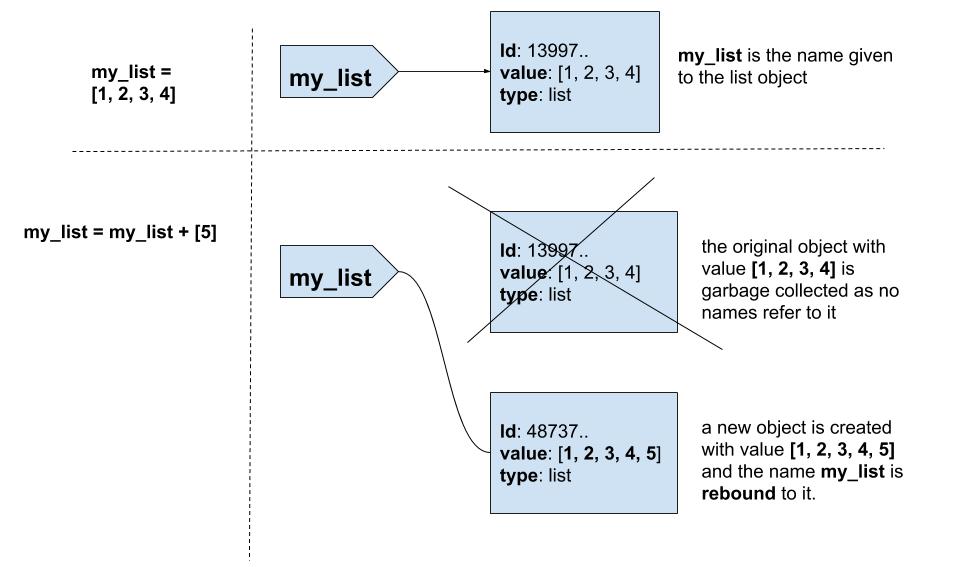
my_list refers to the list [1, 2, 3, 4]. my_list + [5] creates another list object [1, 2, 3, 4, 5, 6] and does not
mutate the original list. Finally, the name my_list is rebound to the new list object. This is
Rebinding my_list
Mutating
Mutating means we are changing the value of an object in place rather than creating a new object.
>>> names = ["Guido", "van"]
>>> id(names)
140413840651464
>>> names
['Guido', 'van']
>>> names.append("Rossum")
>>> names
['Guido', 'van', 'Rossum']
>>> id(names)
140413840651464
names refers to the list ["Guido", "van"]. Using append method, the list object is mutated
in place. It does not create a new object. names still refers to the same list object (id remains the same)but with value
changed to ['Guido', 'van', 'Rossum']
Rebinding and Mutating
>>> x = [1, 2, 3, 4, 5]
>>> x += [6]
>>> x
[1, 2, 3, 4, 5, 6]
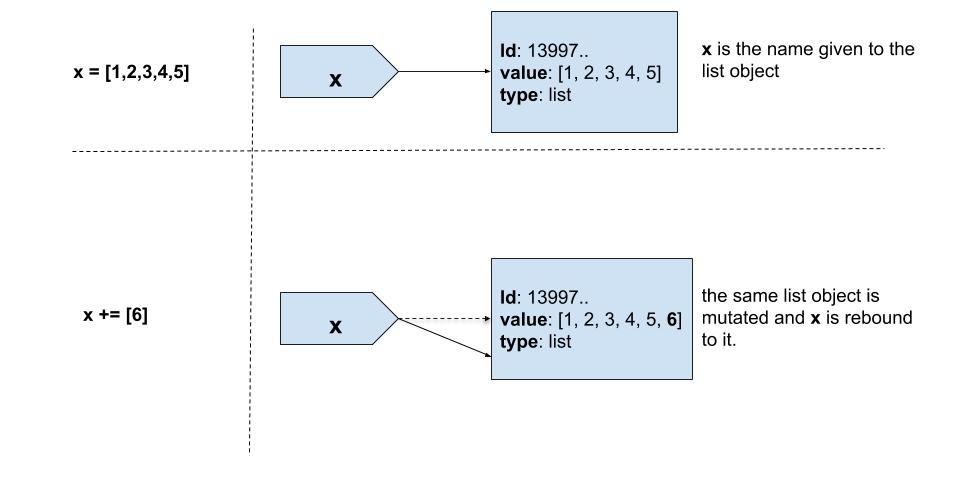
This is an interesting case as both rebinding and mutating happens in x += [6]. Conceptually,
x += [6] is x = x + [6] and it would be considered as rebinding only. However, under the hood, it is
x = x.__iadd__(y). x.__iadd__(y) mutates x and then x = x.__iadd__(y) rebinds x to itself.
Conclusion
This completes the two part series on Python variables. In this post, I explained
the difference between mutating and rebinding with examples. I also illustrated how variables
work with mutable and immutable objects. Understanding these basic concepts can help you in programming
and reasoning Python better. To understand more, I recommend you to watch this
video by Ned Batchelder given at PyCon.
That's it readers, until next time! Happy coding Python!